Photo details, made visible · iPhone

See what your photos carry.

A photo can hold more than the picture: where it was taken, when, with which camera, and sometimes a hidden note about how it was made or edited. CleanCopy shows you all of it, then saves a copy without it. Your original never changes.

  • No account needed
  • No ads, no ad trackers
  • Free to start
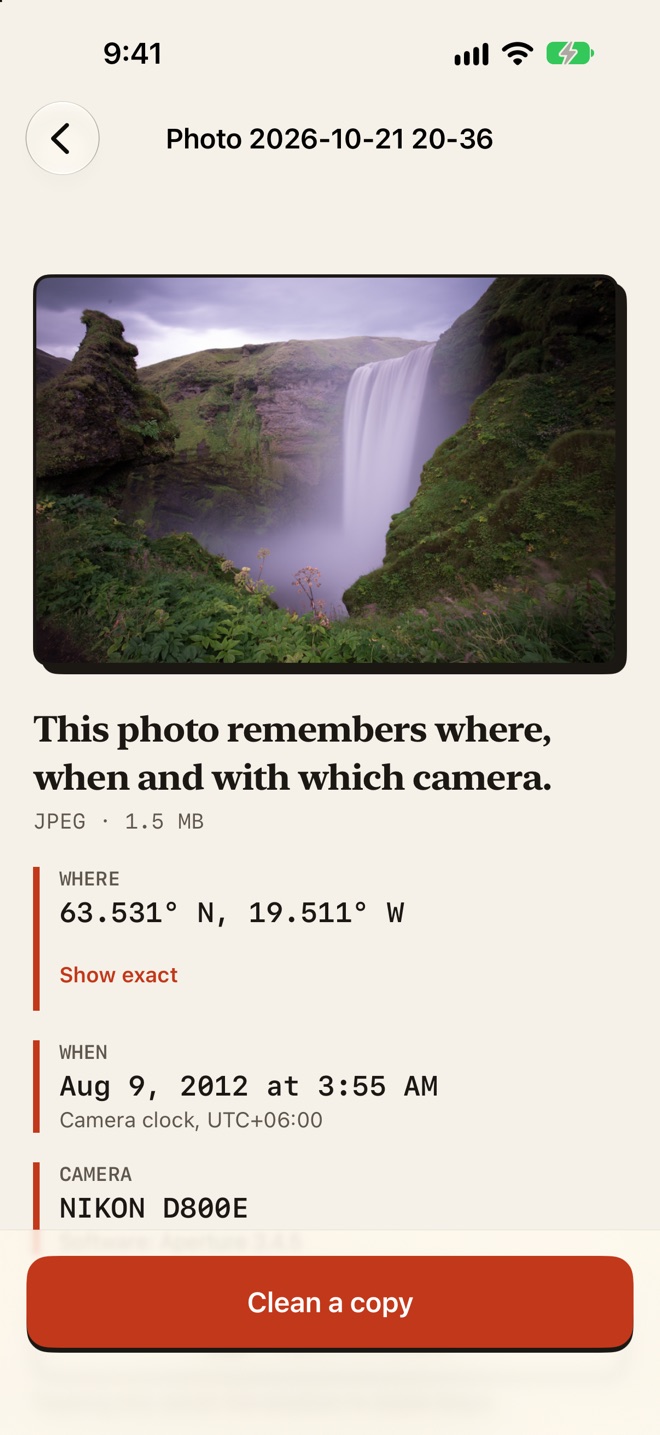
CleanCopy showing a photo's details before cleaning: a position, the date it was taken and the camera model, with a “Clean a copy” button.

How it works

Look first.
Then share.

  1. Pick a photo

    Choose one from your photos or from Files. CleanCopy opens only the photo you pick.

  2. See what it carries

    Where it was taken, when, with which camera, and what else the file holds, before anything changes.

  3. Save a clean copy

    Get a new copy without those details and a report of what was checked. The app tells you where it was saved.

JPEG HEIC PNG WebP AVIF GIF TIFF Read a PDF Video (clean with Pro) Share sheet Up to 20 at once (Pro)

See first

Where, when and
which camera

  • Pick a photo and CleanCopy lists what it carries before anything changes.
  • Location, camera and date details, embedded previews, descriptions and edit history.
  • If a photo records a position, you see it on screen. The Open in Maps button only sends it to Apple Maps when you tap it.
The details screen for a photo: where, when and which camera.

AI labels

See the hidden
“made with AI” note

  • Some AI tools add a hidden note to the file that says how the image was made. Apps can read it.
  • CleanCopy shows the note on the details screen. You choose: save a clean copy without it, or keep it. Neither is the default.
  • It cannot remove invisible watermarks, and apps may still label a photo. Apps and laws may still ask you to say if content is AI-generated or edited.

Read the plain-words explanation

The options sheet for a photo with a hidden note, explained in plain words, with a choice to clean and remove it or clean and keep it.

Proof, not promises

A receipt for
what is gone

  • The original's details are struck through: where, when, which camera.
  • The report lists only the checks that ran, and says when one could not.
  • It always shows where the copy was saved, and your original stays as it is.
The result screen: the original's place, date and camera struck through, with a check that none of it is in the copy.

Photos at once,
one report each

  • CleanCopy Pro cleans up to 20 photos in one batch.
  • Every photo gets its own report. A photo with a hidden note asks you first.
  • Save all the copies to Photos in one step.
A batch of six photos cleaned, each with its own result, and a button to save all six.

Tidy up, too

Find photos
you don't need

  • With CleanCopy Pro, an optional Library tab finds duplicate, similar and blurry photos on your device.
  • Nothing is deleted unless you select it and confirm. At least one photo of every group is kept.
  • It is worked out on your phone, and your favourites can't be selected.
The Library tab listing duplicates, similar photos and blurry photos found on the device.
7photo formats
20photos in one batch
0accounts needed
0ad trackers

Yours, on your phone

No account.
No ad trackers.

Your photos are worked on in the app on your iPhone and are not sent to us. Read the privacy policy.

On your iPhone

Photos are read and cleaned on the device. CleanCopy has no servers that receive them.

Your original stays

CleanCopy always makes a new copy. Your original is never changed.

You choose where it goes

The copy is saved where you tell it: Photos, Files or an app you share to.

Pricing

Free to start.
Two plans for more.

Free

$0

forever

  • See what a photo, video or PDF carries
  • Clean 5 photos a month, in the app, the Share sheet or Shortcuts
  • A report with every copy
  • History
Two plans

CleanCopy Pro

$3.99

a year · auto-renewing subscription

or $12.99 Lifetime · one payment, no renewal

  • Everything in Free, with no monthly limit
  • Clean up to 20 photos in one batch
  • Edit details
  • Clean a video (MOV, MP4 or M4V) into a new copy
  • Unlimited cleans from the share sheet and Shortcuts
  • Scan your library or an album for duplicate, similar and blurry photos
  • A report for each photo
  • Save all the copies in one step

US prices; your App Store shows the price in your currency. Yearly is an auto-renewing subscription: it is charged to your Apple Account and renews every year unless you cancel at least 24 hours before it ends. Manage or cancel it in your Apple Account settings. Lifetime is one payment with no renewal. If you bought Pro before, you keep it at no extra charge. Restore Purchases is in Settings. See the Terms of Use.

Questions

Good to know

What does CleanCopy remove?

Location, camera and date details, embedded previews, and descriptions and edit history. If a photo carries a hidden note about how it was made or edited, CleanCopy asks whether the copy should keep it. The report lists what was removed and what is still there.

Does it change my original photo?

No. CleanCopy makes a new copy and tells you where it was saved. Your original is never changed.

Will it stop an app from labelling my photo as AI?

CleanCopy cannot promise that. It removes details stored in the file. It does not remove invisible watermarks or change what an app detects in other ways, and apps and laws may still require you to say that content is AI-generated or edited. Read the plain-words explanation of the hidden note.

Can CleanCopy remove the AI note from a photo?

If a photo carries the hidden note that says how it was made, CleanCopy shows it and lets you remove it from the copy or keep it. It cannot remove invisible watermarks, and apps may still label a photo. Read the plain-words explanation of the hidden note.

Do I need an account?

No. CleanCopy has no accounts and no ad or tracking SDKs. Your photos are worked on in the app on your iPhone and are not sent to us. Purchases go through Apple and RevenueCat; the privacy policy has the details.

Which files does it work with?

JPEG, HEIC, PNG, WebP, AVIF, GIF and TIFF photos. It can also read a video or a PDF and report what the file carries, and CleanCopy Pro cleans a video into a new copy. For a Live Photo, the copy is the still image only.

What is free, and what is CleanCopy Pro?

Looking at what a photo, video or PDF carries, and the history, are free forever. Cleaning is free for 5 photos each calendar month, shared by the app, the Share sheet and Shortcuts; the allowance restarts on the 1st of each month. CleanCopy Pro removes that limit and lets you clean up to 20 photos in one batch, clean a video, clean from the Share sheet and Shortcuts without a limit, edit details, and scan your library or an album for duplicate, similar and blurry photos. Pro is US$3.99 a year (an auto-renewing subscription) or US$12.99 once for Lifetime, with no renewal. People who bought Pro before keep it for good.

Which iPhones does it run on?

iPhone and iPad with iOS 17 or later.

Which languages is the app in?

The CleanCopy app is available in English, Spanish, Portuguese, French, German and Arabic. The privacy policy, terms of use, support page and hidden-note explainer are in English only.

Is CleanCopy made by Apple or by a social app?

No. CleanCopy is not affiliated with Apple or with any app, website or camera maker.

Look first.
Then share.

Pick a photo and see what it carries. Your original never changes.